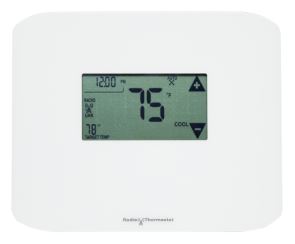
Radio Thermostat Z-Wave Plus CT100 Plus Thermostat
Product Description
- Easy to use and understand touch screen interface, no pesky buttons used on this thermostat.
- PATENTED “TRUE AUTO” ENERGY SAVINGS FEATURE - Designed to automatically save energy with the widest range of comfort settings.
- Whether you have Gas, Oil, Electric, or Heat Pump, this thermostat will work on your system. 2 stage heat, 2 stage cool.
- Battery Backup Operated, Batteries are included.
Working with PhD
- Control your Radio Thermostat and other connected devices with the Zinno app available on iOS&Android
- With PhD, you could automatically turn Radio Thermostat on or off in many scenarios, such as door opens/closes, human appearance detected, and much more
- Also, you can automate the Radio Thermostat with PhD Scence routes, like Good Morning, Goodnight…
- Control Radio Thermostat with voice commands using PhD and the Google Assistant or Amazon Alexa
Add Radio Thermostat to PhD’s network
- On the Zinno app, press Left Menu Bar, then select “Devices”
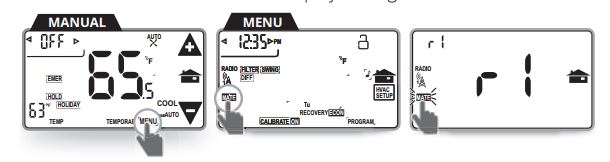
- Select “+” button to put the PhD in inclusion mode, keep your thermostat close to PhD within 10 feet (3 meters)
- From the CT100’s Menu screen, touch MATE under the radio icon. The Network Include screen displays a large “r1”, then touch MATE one more time
- PhD will announce “Found Device”, and Zinno app will display the dialog box, asking user to interact with device one more time
- Repeat step #3, PhD will announce “The device is being added”
- If adding the device successfully, PhD will announce “Adding Radio Thermostat success” and on Zinno app will display the dialog boxes that indicate user has added device successfully
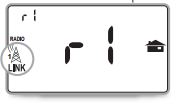
- Also, when the CT100 Plus has successfully joined to PhD Z-Wave network, the MATE icon is replaced by the LINK icon under the radio tower
Specification
- Model number: CT100 Plus
- Power source: 24VAC from HVAC System, Battery
- Battery Type: x4 AA
- Protocol: Z-Wave Plus
- Dimension: 8 x 6 x 1 inches
- Weight: 0.8 pounds
- Color: White